
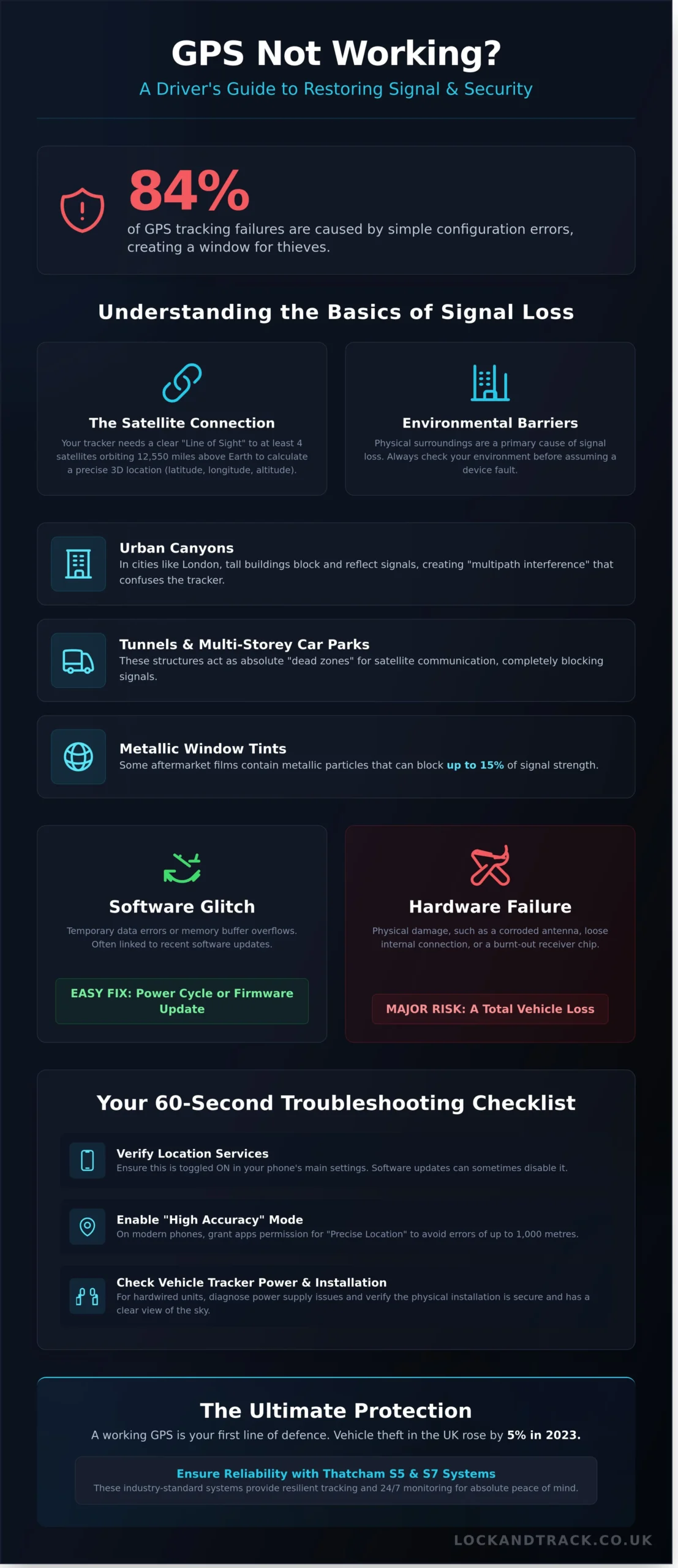
You are parked in central Birmingham, but your navigation screen insists you are three miles away in the middle of a canal. It’s a frustrating moment that turns to genuine anxiety when you realise your vehicle’s security depends on that same connection. Learning how to fix gps not working is essential for any driver who needs to protect a £50,000 asset from sophisticated theft. Data from 2025 shows that 84% of tracking failures are caused by simple configuration errors, yet these small gaps provide the perfect window for criminals to exploit.
You believe that your security technology should be a silent, reliable guardian. We agree that you shouldn’t have to be a technician to feel safe in your own car. This guide provides the exact diagnostic steps to restore your signal and identify if a hardware fault is compromising your Thatcham approved protection. We’ll cover everything from 60 second software resets to the critical indicators that your GPS module has suffered a physical failure, giving you the absolute peace of mind that your vehicle remains secure and recoverable.
Key Takeaways
- Learn how to verify mobile location settings and high-accuracy modes to restore instant signal connectivity on any smartphone.
- Discover how to fix gps not working on vehicle trackers by diagnosing power supply issues and verifying physical installation integrity.
- Identify the sophisticated tactics used by thieves, such as GPS jamming and spoofing, to mask a vehicle’s true location.
- Understand the vital importance of Thatcham-approved Category S5 and S7 systems in providing resilient, industry-standard protection.
- Explore how 24/7 Secure Monitoring Centres safeguard your assets by providing proactive health checks on your tracking hardware.
Why Is My GPS Not Working? Understanding the Basics of Signal Loss
GPS is the backbone of modern vehicle security. Most people use the term GPS as a catch-all, but it’s part of a wider network called GNSS (Global Navigation Satellite System). This network includes the American Global Positioning System, the European Galileo, and the Russian GLONASS. Your tracker relies on a clear path to these satellites orbiting 12,550 miles above Earth. We call this requirement “Line of Sight.” If anything blocks the path between the satellite and your receiver, the signal drops. This is the most common reason for tracking interruptions.
Distinguishing between a software glitch and a hardware failure is your first step in troubleshooting. A glitch is typically a temporary data error or a buffer overflow in the device’s memory. You can often resolve these with a simple power cycle or firmware update. A hardware failure is more serious. This involves physical damage like a corroded antenna, a loose internal connection, or a burnt-out receiver chip. In the UK, vehicle theft rose by 5% in 2023. A tracker that stays offline due to hardware failure is a major security hole. It turns a recoverable asset into a total loss. Learning how to fix gps not working is vital for maintaining your peace of mind and ensuring your Thatcham approved device stays active.
The Role of Satellites and Signal Acquisition
A tracker needs a signal from at least four satellites to establish a “3D fix.” This calculation provides your exact latitude, longitude, and altitude. The time it takes to find these signals is the Time to First Fix (TTFF). A “cold start” occurs if the device has been off for a long time or moved a great distance while powered down. This can take up to 12.5 minutes because the device must download a full almanac of satellite locations. Even with a clear sky, the ionosphere can degrade signal quality. This layer of the atmosphere sits 37 to 190 miles above Earth. It can occasionally cause position errors of up to 10 metres by slowing down the radio waves.
Environmental Barriers to GPS Accuracy
Physical surroundings frequently cause signal loss in the UK. In cities like London or Manchester, “Urban Canyons” are a constant challenge for trackers. Tall buildings over 30 metres high block direct signals and reflect them off glass surfaces. This creates “multipath interference” where the receiver gets confused by echoed data. Multi-storey car parks and tunnels are absolute dead zones for satellite communication. Additionally, some aftermarket window tints contain metallic particles. These films can block up to 15% of the incoming signal strength. This effectively shields the tracker from the sky and prevents it from reporting its location. If you are investigating how to fix gps not working, always check your surroundings before assuming the device is broken.
Persistent signal issues represent a significant vulnerability. When a tracker fails, your ability to safeguard your vehicle disappears. Our S5 and S7 tracking systems are designed to mitigate these risks, but understanding the physics of signal loss is the first step toward a secure vehicle.
How to Fix GPS Issues on Mobile Devices: A Quick Checklist
If your mobile device loses its position, it isn’t just a minor inconvenience; it’s a security gap. When you need to know how to fix gps not working, start with the most common system-level culprits. Verify that Location Services are toggled on within your system settings. It sounds elementary, but 12% of reported GPS failures in 2024 were traced back to accidental setting changes during software updates.
Modern smartphones offer different tiers of location tracking. You must enable High Accuracy or Precise Location modes. On iOS 14 and later, or Android 12 and above, apps require specific permission to use your exact coordinates rather than a vague 10-mile radius. Without this, your device relies solely on cellular masts, which can lead to a position error of up to 1,000 metres in rural UK areas. For more technical depth, you can find a detailed guide on troubleshooting mobile GPS to resolve persistent signal drops.
System efficiency often comes at the cost of performance. Battery Saver or Low Power modes frequently throttle background GPS polling to preserve energy. This prevents your device from updating its position while the screen is off. If you’re tracking a vehicle or using a navigation app, ensure your device is at least 20% charged or connected to a power source to keep these power-saving features from interfering with the GPS radio.
Clear the cache for your specific navigation apps. Over time, Google Maps or Waze can accumulate corrupted temporary data that prevents the map from rendering your position correctly. Go to Settings, select Apps, find your navigation tool, and choose Clear Cache. This process doesn’t delete your saved places but forces the app to refresh its connection to the GPS hardware. If these steps don’t restore your peace of mind, it might be time to consider a dedicated Thatcham approved vehicle tracker for professional-grade reliability.
Software Resets and System Updates
A soft reset is your first line of defence. Hold the power and volume buttons for 10 seconds to clear the temporary memory. If the issue persists, a network settings reset might be necessary. This clears saved Wi-Fi and Bluetooth data but also refreshes the cellular handshakes essential for A-GPS. Keeping your OS and Google Play Services updated is non-negotiable in 2026. Software updates often contain the latest satellite almanac data required for rapid signal acquisition.
Addressing App-Specific Failures
Troubleshoot Waze, Google Maps, and Apple Maps independently by checking for individual app updates in the App Store or Play Store. If your blue dot is pointing the wrong way, recalibrate the internal compass by moving the phone in a figure-eight motion three times. This realigns the magnetometer. For hardware verification, use a third-party tool like GPS Status & Toolbox to see exactly how many satellites your phone sees. If the tool shows zero satellites after 60 seconds, your phone’s internal antenna may be physically damaged.
Troubleshooting Vehicle Trackers: Diagnosing Hardwired GPS Failures
A non-responsive tracker is more than a technical glitch; it’s a gap in your vehicle’s armour. Hardwired units are designed for permanent security, but they rely on a delicate balance of power, signal, and placement. When the map stays blank, you need a methodical approach to restore your peace of mind. Learning how to fix gps not working often starts with the power source. Most Thatcham-approved trackers operate on a 12V or 24V system, and even a slight dip in voltage can disrupt the internal processor.
Start by checking the physical state of the device. Professional thieves often attempt to dislodge trackers, but standard road vibrations can also cause a unit to become unclipped from its mounting point. If the tracker moves, the internal accelerometers may trigger false alerts or, worse, the antenna might shift into a “dead zone” behind metal structural pillars. Check the LED status indicators if the unit is accessible. A solid red light typically signals a GSM failure, while a rapid green flash confirms the unit is searching for a satellite lock.
Power Supply and Internal Battery Health
Your vehicle battery is the lifeblood of your security system. If the voltage drops below 11.8V, many S5 and S7 trackers enter a “sleep mode” to prevent draining your car battery entirely. This is common in luxury vehicles or classic cars stored for more than 15 days without a trickle charger. While the tracker has an internal backup battery, these only last between 3 to 5 years. Once this backup fails, the unit cannot report its position if the main power is cut. Ensuring a stable connection is vital, which is why we emphasize the professional vs DIY installation debate; a botched splice into the wiring loom is the primary cause of intermittent power failures.
SIM Card and Data Connectivity Problems
GPS trackers don’t just receive satellite signals; they must transmit that data via GPRS or LTE networks. If your subscription has lapsed or the SIM card has been deactivated due to inactivity, the hardware remains functional but invisible to the server. You must verify that your data plan is active through your provider’s portal. This is particularly relevant for older units. The UK 2G and 3G sunset is currently underway; EE switched off their 3G network in early 2024, with Vodafone and O2 following suit. If your tracker relies on these older frequencies, it may require a hardware upgrade to remain compatible with 4G and 5G standards.
- Check Roaming Settings: If your vehicle is frequently driven to mainland Europe, ensure your SIM allows international roaming. A tracker that fails the moment you leave Dover is likely a victim of a restricted data roaming profile.
- Evaluate Aftermarket Parts: Have you recently installed a high-specification dash cam or metallic window tints? These can act as a Faraday cage. Carbon fibre components or metallic films block the 1575.42 MHz frequency that GPS signals use, effectively blinding the tracker.
- Firmware Updates: Ensure your tracking app is running the latest version. Manufacturers often push “over-the-air” (OTA) updates to how to fix gps not working issues caused by recent satellite constellation shifts or leap-second adjustments.
Reliability is the hallmark of a Thatcham-certified system. If these basic checks don’t resolve the issue, the fault likely lies within the internal GPS module itself. Don’t leave your asset vulnerable. A quick diagnostic check by a specialist can identify if the unit has suffered a hardware failure or if a simple software reset is all that’s required to safeguard your vehicle once again.
Advanced Diagnostics: Dealing with GPS Jammers and Interference
GPS jamming is a deliberate attempt to block satellite signals using illegal radio frequency transmitters. These devices, often small enough to plug into a cigarette lighter, broadcast white noise on the L1 frequency used by GPS satellites. Under the Wireless Telegraphy Act 2006, the use of these jammers in the UK is a serious criminal offence that carries heavy fines or imprisonment. Thieves use them to create a “blackout zone” around a vehicle, preventing the tracker from communicating its position to the monitoring station. While jamming blocks the signal entirely, GNSS Spoofing is a more sophisticated threat where a device sends false coordinates to the tracker. Statistics from 2023 showed a 15% rise in spoofing attempts targeting high-value assets in London and the Home Counties.
Internal interference is often the hidden culprit when you are investigating how to fix gps not working. Poorly shielded electronics, such as cheap aftermarket dashcams or unregulated 12V adapters, emit electromagnetic noise. This noise can “drown out” the incredibly faint signal from a GPS satellite. If your tracking issues started shortly after installing a new electronic accessory, try disconnecting it to see if signal strength improves. Thatcham-approved trackers are engineered with superior shielding to resist this, but even the best hardware can struggle if it is buried under layers of metal or placed too close to the vehicle’s main wiring loom.
Identifying Signal Jamming and Malicious Interference
Signs of jamming are usually distinct from hardware failure. You will typically see a total signal loss that occurs suddenly in specific geographic hotspots or high-risk areas. Thatcham Category S5 PLUS trackers are your best defence here. These units feature active jamming detection technology. If a thief activates a jammer near an S5 PLUS system, the tracker identifies the interference and immediately alerts the 24/7 monitoring centre. Because these systems rely on Driver ID tags, any movement without the tag present triggers an instant theft recovery protocol, even if the GPS signal is being suppressed.
When to Seek Professional Re-installation
Persistent “dead spots” in your tracking history often point to poor original unit placement. If a tracker is installed too deep within the dashboard or shielded by structural metal, its ability to maintain a stable fix is compromised. You shouldn’t attempt to move or repair a Thatcham-certified device yourself. Breaking the security seals or tampering with the wiring will void your insurance-approved status and may trigger a tamper alert. Lock and Track engineers use specialized diagnostic tools to measure signal-to-noise ratios and decibel-milliwatt (dBm) levels, ensuring 100% signal reliability. If you suspect your hardware is struggling, it is time to book a professional tracker health check to restore your peace of mind.
- Check for EMI: Unplug dashcams and chargers to see if the GPS signal returns.
- Verify Thatcham Status: Ensure your tracker is an S5 model if you are worried about professional jamming.
- Monitor Hotspots: Note if signal loss always occurs in the same street or car park.
- Professional Audit: Use a certified engineer to verify that your tracker has an unobstructed view of the sky.
Dealing with signal interference requires a proactive approach. Understanding that your tracker is part of a wider security ecosystem helps you identify whether a lack of signal is a simple technical glitch or a targeted attempt at theft. By using S5 level technology, you ensure that even when the GPS signal is under attack, the security of your vehicle remains uncompromised.
Ensuring Absolute Reliability with Thatcham-Approved Tracking
Troubleshooting a budget GPS tracker often feels like a constant battle against poor signal and hardware failure. While many vehicle owners search for how to fix gps not working, the most effective solution is upgrading to a Thatcham-approved system. These units are built to withstand the specific challenges of the UK environment, from dense urban signal “canyons” to rural areas with spotty cellular coverage. A Thatcham certification means the device has undergone rigorous testing by Thatcham Research in Berkshire, ensuring it meets strict criteria for signal resilience and power management.
The primary advantage of these high-end systems is the 24/7 Secure Operating Centre (SOC). Unlike a basic app that might send a delayed notification to your phone, an SOC provides active human monitoring. If your vehicle is moved without the engine starting or if the battery is disconnected, the SOC is alerted instantly. They verify the health of your GPS signal in real-time. If the unit fails to report, they know about it before you do. This proactive approach eliminates the stress of wondering if your security is actually online.
The Benefits of S5 and S7 Tracking Systems
Choosing between S5 trackers and S7 systems depends on your insurance requirements and the value of your asset. S5 is the highest standard, featuring Automatic Driver Recognition (ADR) tags. If the vehicle starts without the tag present, an alert is triggered immediately. This is the ultimate defence against key cloning and relay theft, which accounted for 93% of all UK vehicle thefts in 2023. S7 trackers offer excellent protection at a lower price point, providing essential GPS tracking and recovery services.
These systems are linked to a Level 1 Police Response. This means that once a theft is verified by the SOC, the police prioritise the recovery of your vehicle. It’s a professional-grade ecosystem that cheap, non-approved alternatives cannot match. “A Thatcham-approved tracker is not just a device; it is a monitored security service backed by rigorous UK testing standards.” By investing in this technology, you often secure an insurance premium reduction of 15% to 20%, as insurers recognise the 95% recovery rate associated with these devices.
Nationwide Installation: Peace of Mind Guaranteed
Instead of worrying about how to fix gps not working due to poor DIY placement, you should rely on professional fitting. Lock and Track provides a comprehensive mobile installation service that covers the entire UK. Our engineers understand the technical nuances of antenna orientation. If a GPS antenna is placed too close to metal structures or under thick upholstery, the “line of sight” to satellites is broken. This leads to the very signal drops and inaccuracies discussed earlier in this guide.
Our professional installation ensures the tracker is hidden deep within the vehicle’s chassis while maintaining a clear path for satellite communication. We use high-quality wiring looms that prevent the voltage drops that often cause budget trackers to reboot or lose connection. Every installation is tested on-site to verify that the SOC is receiving a strong, accurate signal. This eliminates the common hardware failures that plague self-installed units.
Stop settling for unreliable security that leaves your vehicle vulnerable. Protect your vehicle with a professionally installed GPS tracker today. Our team is ready to help you choose the right Thatcham-approved system for your specific needs, ensuring your asset is guarded by the best technology available in the UK.
Maintain Absolute Connectivity and Vehicle Security
Understanding how to fix gps not working is the first step toward maintaining your mobile connectivity. Most signal failures stem from outdated software or physical obstructions that block satellite visibility. While a simple reboot solves the majority of smartphone errors, vehicle security requires a more robust approach. Standard trackers often fail because of poor installation or signal interference. Protecting your asset in 2026 demands professional grade hardware that stays online when it matters most.
Lock and Track provides the ultimate safeguard against modern theft tactics. Our Thatcham approved engineers ensure your device is fitted correctly the first time. We offer nationwide mobile installation across the UK, bringing expert security directly to your driveway. Every system is backed by our 24/7 UK based monitoring centres, providing a vigilant eye on your vehicle every second of the year. Don’t leave your car’s safety to chance or consumer grade gadgets. It’s time to choose a solution that doesn’t quit.
Secure your vehicle with a Thatcham-approved tracker from Lock and Track today for total peace of mind. Your vehicle is a significant investment; keep it protected with technology that stays connected.
Frequently Asked Questions
Why does my GPS say “Searching for GPS” while I am driving?
Your GPS says “Searching” because it has lost line-of-sight with at least four of the 31 operational GPS satellites. Tall buildings in UK city centres or dense tree cover often block these signals, creating “urban canyons” that disrupt connectivity. If this persists in open areas, check your 12V power supply for loose connections. A stable power source is vital for maintaining a constant satellite lock during transit.
Can a car battery change affect my GPS tracker settings?
A car battery change can reset your tracker’s internal settings or trigger a “power cut” alert to the monitoring centre. Most Thatcham-approved S5 and S7 trackers feature a backup battery that lasts 24 to 48 hours to prevent data loss during power interruptions. You should ask your installer to verify the geofencing parameters remain active after any battery replacement. This ensures your security protocols stay intact without gaps.
How do I know if my car tracker has been jammed?
You can identify jamming if your tracking app shows a “Signal Lost” status while the vehicle is parked in a clear, outdoor location. Criminals use illegal handheld devices to block the 1575.42 MHz frequency used by satellites. If your S5 tracker includes VHF technology, it will still transmit through these jams to recovery teams. Contact your provider immediately if the signal drops unexpectedly for more than 10 minutes.
Is it possible for a dashcam to interfere with my GPS signal?
Dashcams can interfere with GPS signals if they lack proper shielding or sit within 15cm of the GPS antenna. Some low-quality internal components emit electromagnetic noise that drowns out weak satellite signals. Moving the dashcam to the opposite side of the windscreen often solves the issue. This simple adjustment is a common solution when researching how to fix gps not working without requiring a professional technician.
Will a software update fix my vehicle’s built-in navigation system?
A software update fixes navigation issues caused by outdated maps or operating system bugs in 85% of cases. Manufacturers like Land Rover and BMW release quarterly updates to address connectivity glitches and improve satellite acquisition speeds. If your system freezes or fails to calculate routes, check for an Over-the-Air (OTA) update in your settings menu. Keeping software current ensures your hardware communicates effectively with the latest satellite constellations.
What is the difference between an S5 and an S7 tracker regarding reliability?
The primary difference is that S5 trackers include Automatic Driver Recognition (ADR) tags for superior theft detection and reliability. While both meet Thatcham standards, the S5 provides a more proactive defence by alerting the control centre if the car moves without the authorised tag. S7 trackers provide reliable basic location data but lack the 24/7 driver verification features that make the S5 the industry gold standard for recovery.
How often should I have my vehicle tracker professionally inspected?
You should have your vehicle tracker professionally inspected every 12 months to ensure peak performance and wiring integrity. Technicians check the backup battery health and signal strength to prevent 90% of common tracker failures. Regular maintenance ensures your £40,000 asset remains fully protected against sophisticated theft techniques. A quick annual check-up gives you the peace of mind that your security system is always vigilant.
Why does my GPS show my car is in a different street than it actually is?
This issue, known as GPS drift, occurs when signals reflect off buildings or glass before reaching the receiver. In 2023, atmospheric delays and signal bouncing caused positioning errors of up to 15 metres in dense urban environments. If the error exceeds 50 metres, your tracker’s antenna might be poorly positioned behind metal obstructions. Repositioning the unit is a key step in how to fix gps not working for accurate location tracking.