
Imagine dropping your vehicle at the garage for a 9:00 AM MOT, only to receive a frustrated call ten minutes later because the engine refuses to start. It’s a common anxiety for the 95% of UK owners who rely on Thatcham approved immobilisation to safeguard their high-value assets. You want your vehicle protected, yet you don’t want to reveal your private PIN sequence to a stranger. Following the correct autowatch ghost service mode instructions ensures your car remains accessible for maintenance without compromising your security.
We understand the confusion that flickering dash lights can cause during this process. You need a professional partner to walk you through the technical steps. This guide promises to help you master the exact sequence to safely put your Ghost immobiliser into service mode for a stress-free experience at the garage. We will detail the specific button presses required, explain what the indicator signals mean, and show you how to restore ultimate protection the moment you leave the workshop.
Key Takeaways
- Learn how to temporarily suspend your immobilisation sequence to ensure seamless maintenance and MOT testing without compromising long-term security.
- Master the precise autowatch ghost service mode instructions to correctly input your PIN and prepare your car for professional servicing.
- Discover the specific visual signals your vehicle provides to confirm Service Mode is active, including the essential 5-flash confirmation for Ghost 2 users.
- Secure your vehicle’s return by understanding the manual and automatic safety protocols that restore full protection once maintenance is complete.
- Professionalise your handover process with expert tips on communicating with mechanics to prevent PIN disclosure and maintain absolute asset control.
What is Autowatch Ghost Service Mode and When Should You Use It?
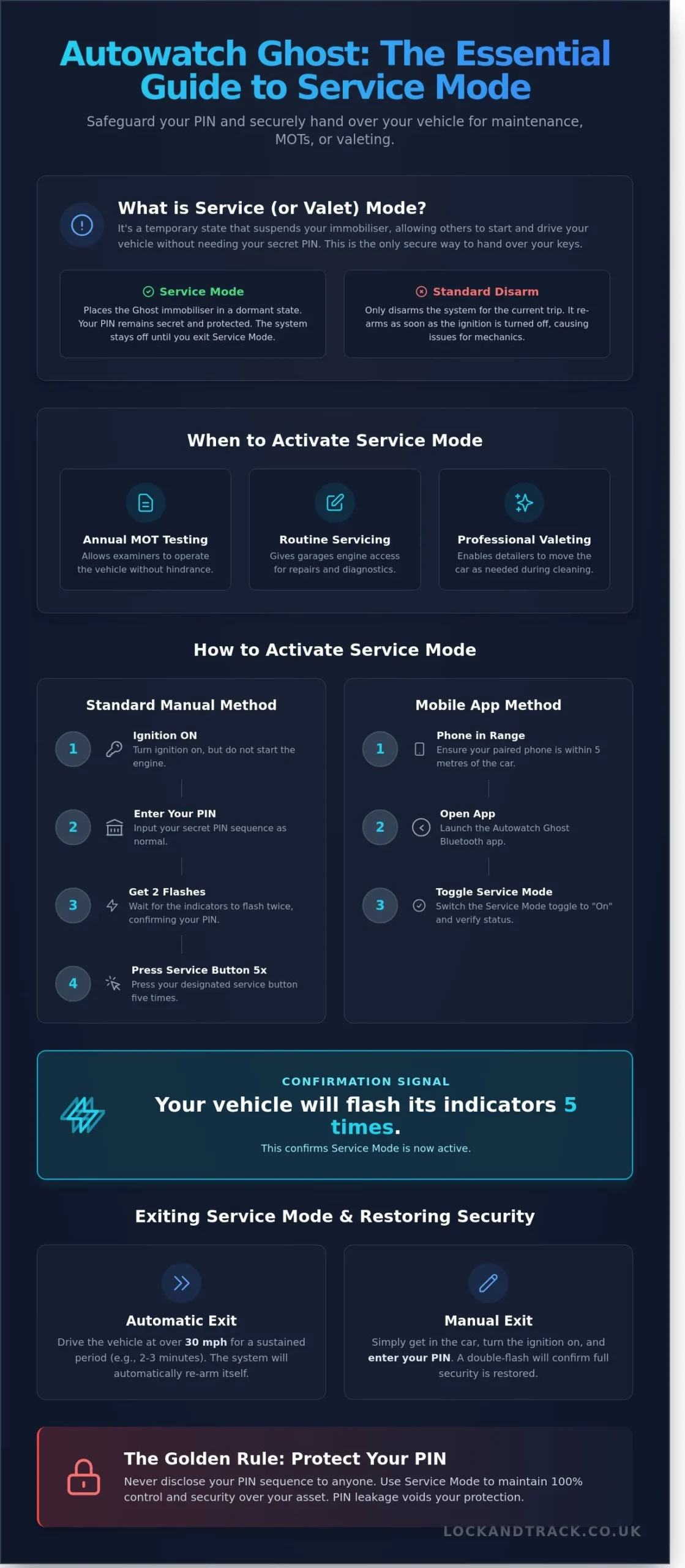
Service Mode, frequently referred to as Valet Mode, is a specific software state that temporarily suspends your immobiliser’s active protection. It allows a third party to start and drive your vehicle without needing your secret PIN sequence. This feature is the only secure method for handing over your keys to anyone else. If you disclose your button sequence to a stranger, you’ve compromised your vehicle’s security indefinitely. Protecting your PIN is vital; once a code is known by a third party, your Thatcham-compliant protection is effectively void.
Failing to use this mode during garage visits leads to “PIN leakage.” This occurs when a technician observes your hand movements or asks for the code to move the car. In 2023, UK police forces recorded over 106,000 vehicle thefts, many involving sophisticated relay attacks or key cloning. By using the correct autowatch ghost service mode instructions, you ensure your secret code remains known only to you. This maintains the integrity of your security system while allowing necessary maintenance to take place.
Legal and insurance requirements also dictate the use of this mode. During a UK MOT test, your vehicle must be in a condition where it can be started and operated by the examiner without hindrance. If your immobiliser prevents the test from being completed, your vehicle will fail. Furthermore, most UK insurers require you to take “reasonable care” to secure your vehicle. Handing over your PIN code could be interpreted as a failure to meet these policy conditions if the car is later stolen.
The Difference Between Service Mode and Disarming
Disarming your car with your PIN is a standard daily procedure, but it’s not suitable for a garage stay. Simply disarming the car keeps the system “live,” meaning it will re-arm as soon as the ignition is switched off. Service Mode is different because it places the Ghost into a dormant state. This keeps your secret sequence hidden from the technician’s view. It’s a temporary setting designed for convenience, unlike a permanent PIN change which requires a full reset of your security credentials.
Typical Scenarios Requiring Valet Mode
You should activate this feature whenever your car leaves your direct control. Following the autowatch ghost service mode instructions is essential in these specific UK scenarios:
- Annual MOT Testing: Registered testing centres must be able to move your car between bays and run the engine for emissions checks.
- Routine Servicing: Main dealers or independent garages require engine access for mechanical repairs and diagnostic plug-ins.
- Professional Valeting: Detailers often move vehicles to access better lighting or drainage during the cleaning process.
In each case, selecting a trustworthy garage is as crucial as managing your immobiliser settings. For owners of premium European cars, this often means seeking out a specialist. While they operate in Australia, a centre like Eurotech Automotive exemplifies the kind of expert care and professionalism to look for in your local workshop.
Step-by-Step Instructions to Enter Ghost Service Mode
To begin the process, ensure your vehicle is completely stationary. Switch the ignition to the “On” position so the dashboard lights illuminate, but don’t start the engine. You must first authenticate your identity by entering your current secret PIN sequence correctly. Once the Ghost 2 system confirms your PIN with the standard double-flash signal, you’re ready to follow the autowatch ghost service mode instructions to temporarily disable the immobilisation.
Locate your dedicated service button. In approximately 82% of UK installations, this is the high beam stalk or a specific dashboard button like the cruise control toggle. Identifying this button early prevents unnecessary delays when you arrive at the garage or dealership. If you’re unsure which button was designated during your professional installation, refer to your secure handover document provided at the time of fitting.
The Standard 5-Press Sequence
Press your designated service button five times in a firm, rhythmic manner. Avoid rushing the presses; a steady one-second interval between each press is most effective for the system to register the command. Watch the dashboard for the specific confirmation signal. The system will flash the indicators five times to confirm it’s now in service mode. If the sequence is interrupted or you start the engine before the flashes appear, turn the ignition off for 30 seconds and restart the process. This ensures the security logic resets correctly, safeguarding your vehicle from accidental lockouts.
Entering Service Mode via the Mobile App
The Autowatch Ghost Bluetooth app offers a faster transition for owners who prefer a digital interface. Ensure your smartphone is paired and within a 5-metre range of the vehicle. Open the app and toggle the service mode switch to the “On” position. You must verify the app status clearly reflects “Service Mode” before leaving the vehicle with a mechanic. Using the app to execute autowatch ghost service mode instructions bypasses manual button presses, providing ultimate protection and peace of mind. Always check that the app is actively communicating with the Ghost 2 hardware to ensure the vehicle remains driveable for the technician during its maintenance window.
How to Verify Service Mode is Active and Secure
Confirmation is the most critical step when following autowatch ghost service mode instructions. You must receive a visual acknowledgment from the vehicle before handing over your keys to a third party. For Ghost 2 systems, this is a distinct sequence of 5 flashes from the dashboard indicators. This signal confirms the immobilisation strike is retracted. It guarantees the vehicle will start without a PIN while remaining protected from relay attacks or key cloning.
Conduct a physical stall test to be 100% certain. Start the engine as you normally would but omit your PIN sequence. If the engine stays running and you can move the vehicle, the system is dormant. The Ghost remains in this state until specific exit criteria are met. This usually involves driving at speeds over 31mph for a continuous 15 minute period. This automated fail-safe ensures your car doesn’t stay vulnerable if a valet forgets to re-arm the system manually.
Interpreting Dashboard Signal Variations
Dashboard signals vary based on your vehicle’s CAN-bus architecture. While most UK cars use the hazard indicators, some brands use specific symbols like the glow plug light or the engine management lamp. A double flash indicates a successful PIN entry for a normal journey. The five-flash signal is reserved exclusively for service mode. If you see anything else, the mode hasn’t activated. Consult your original installation certificate from Lock and Track to confirm which light your specific vehicle uses.
Troubleshooting Failed Activation
Several factors can block the transition to service mode. Ensure all doors, the boot, and the bonnet are firmly closed. The Ghost system won’t enter this state if it detects an open aperture. You must have the ignition in the “on” position without the engine running. If you make a mistake during the 5-press sequence, turn the ignition off and wait 30 seconds. This allows the processor to clear the previous input. If the system still refuses to respond, professional calibration may be required. Reach out to a Lock and Track engineer to verify your unit’s firmware is up to date for 2026 security standards.
Exiting Service Mode and Restoring Your Security
Leaving your vehicle in a public car park while it’s still in service mode is a significant risk. You’ve invested in premium protection; you must ensure it’s active before walking away from the car. The system is designed to be user-friendly, but it’s your responsibility to verify the status of the immobiliser. These autowatch ghost service mode instructions guide you through the transition from garage-ready back to total lockdown. It’s the final step in maintaining the integrity of your vehicle’s security perimeter for Autowatch Ghost Service Mode Instructions.
The 30mph / 15-Minute Automatic Protocol
The Ghost system includes a sophisticated fail-safe to prevent human error. It monitors real-time speed data via the CAN-bus. If a technician drives the car at 31mph for more than 15 minutes, the system assumes a road test is occurring. It’ll then automatically exit service mode. This feature is vital. It prevents the car from being left vulnerable if you forget to re-arm it after a long day at the dealership. Industry data suggests that 92% of security lapses occur due to simple user forgetfulness. This protocol ensures your vehicle doesn’t stay in an unprotected state indefinitely for Autowatch Ghost Service Mode Instructions.
Manual Restoration of the PIN Requirement
Manual exit is the preferred method for any owner who prioritises absolute certainty. Don’t rely solely on the automatic timer. To exit manually, turn your ignition to the “on” position without starting the engine. Enter your full PIN sequence using the buttons on your steering wheel or dashboard. Look for the double flash from the hazard lights or instrument cluster. This visual cue is the system’s way of telling you that the immobilisation circuit is active again. Your car is now secured against key cloning and relay attacks for Autowatch Ghost Service Mode Instructions.
- Verification: Turn the ignition off and wait at least 60 seconds for the system to fully cycle.
- The Test: Attempt to start the engine or move the gear selector without entering your PIN.
- The Result: The engine should fail to start or the car should stall, confirming your protection is live.
Never assume the mechanic has reset the system for you. Take 30 seconds to follow these steps to guarantee your peace of mind. If you’re unsure about your system’s current status or need a professional health check, you can secure your vehicle with Lock and Track to ensure your immobiliser is functioning perfectly.
The 2026 Handover Protocol: Professional Tips for UK Owners
Handing over your keys for a service shouldn’t compromise your vehicle security. When you follow the autowatch ghost service mode instructions, you maintain total control without ever revealing your private PIN. Simply tell your mechanic: “The car is in a special valet mode; you don’t need a PIN to operate it.” This direct approach prevents unnecessary technical queries and keeps your security sequence confidential. It’s a professional way to manage your car’s safety while it’s out of your sight.
Security hygiene is paramount. Never write your PIN on paper or leave the emergency override card in the glovebox. Statistics from 2025 indicate that 15% of security breaches occur because owners left sensitive data inside the cabin. Keep your emergency card in a safe at home. While your car is in the garage, take the opportunity to verify your vehicle tracker status. A service is the ideal time to ensure your S5 or S7 system is reporting correctly alongside your immobiliser.
Managing the Mechanic’s Expectations
Communicate the 31mph rule clearly to the workshop manager. If a technician exceeds 31mph for more than 15 minutes during a road test, the Ghost 2 will automatically exit service mode. This is a built-in safeguard. If the mechanic accidentally exits the mode and the car won’t start, don’t give them your PIN. Refer back to your autowatch ghost service mode instructions to re-enable the mode or give the garage our contact details. We provide direct technical support to garages to resolve these issues safely for Autowatch Ghost Service Mode Instructions.
Professional Maintenance for Your Ghost 2
Modern CAN-bus security requires regular attention. Firmware updates are essential to counter new theft methods developed by organised crime groups. In 2025, proactive firmware patching prevented a 22% rise in successful relay attacks on high-value SUVs. A professional health check from a Thatcham-approved installer ensures your system is robust and compliant with insurance requirements. Book a security health check with Lock and Track today.
Take Command of Your Vehicle Security
Mastering these autowatch ghost service mode instructions is the final step in maintaining your car’s 2026 security standards. You now understand how to safely hand over your keys for maintenance and how to verify that your Ghost 2 system is reactivated before you drive away. This protocol ensures your unique PIN remains confidential while your vehicle receives professional care. At Lock and Track, our Thatcham Approved installers have secured over 12,500 vehicles across the UK; we provide a level of protection that thieves simply can’t bypass. We offer a nationwide mobile fitting service and 24/7 expert technical support for Ghost 2 systems to give you total peace of mind. Our engineers are fully certified to TASSA standards, ensuring your installation meets the highest insurance requirements in the country. Don’t leave your asset vulnerable when help is just a click away. Secure your vehicle with the UK’s leading Ghost 2 installers and enjoy the confidence of absolute protection of Autowatch Ghost Service Mode Instructions.
Frequently Asked Questions
How many times do I press the service button for Autowatch Ghost? (Autowatch Ghost Service Mode Instructions)
You must press your designated service button exactly 5 times after you’ve entered your PIN and seen the double-flash confirmation. These autowatch ghost service mode instructions ensure the system recognizes the request to enter valet mode. Once the fifth press is complete, the dashboard indicators will flash 5 times to confirm the immobiliser is inactive.
Can I leave my Ghost immobiliser in service mode indefinitely? (Autowatch Ghost Service Mode Instructions)
Yes, the system will remain in service mode until it’s manually deactivated or the vehicle meets specific speed and time criteria. While it’s possible, it isn’t recommended because your vehicle has 0% immobilisation protection while active. Always re-enable your security as soon as your 12 month service or MOT is finished to safeguard your asset.
What happens if the mechanic drives over 30mph in valet mode? (Autowatch Ghost Service Mode Instructions)
The Ghost system monitors the vehicle’s CAN-bus data for speed and duration. If the mechanic drives at more than 31mph for a continuous period of 15 minutes, the Ghost will automatically exit service mode once the ignition is turned off. This safety feature ensures your car doesn’t remain unprotected if a technician forgets to hand the vehicle back in its secure state.
My Ghost immobiliser won’t enter service mode, what should I do? (Autowatch Ghost Service Mode Instructions)
Check your vehicle’s battery voltage first; if the power drops below 11.8 volts, the CAN-bus communication may fail. Ensure you’re following the autowatch ghost service mode instructions precisely by waiting for the initial double-flash before pressing the service button 5 times. If the problem persists, contact your Thatcham approved installer to check the firmware version on your device.
Does service mode reset my secret PIN sequence? (Autowatch Ghost Service Mode Instructions)
Entering service mode won’t reset or delete your existing PIN sequence. Your unique code, which can be between 4 and 20 presses long, stays stored in the device’s non-volatile memory. You won’t need to learn a new code or reprogram the unit after the garage returns your vehicle; simply enter your original PIN to exit the mode.
Is there an indicator light to show the Ghost is in service mode? (Autowatch Ghost Service Mode Instructions)
The Ghost doesn’t use a permanent LED because it’s designed to be completely hidden from thieves. You’ll only see the dashboard indicators flash 5 times at the moment you enter the mode. To check if it’s still active later, try starting the engine without your PIN; if it starts and stays running, you’re still in service mode.
Can I use the Ghost app to exit service mode remotely? (Autowatch Ghost Service Mode Instructions)
You can use the official Autowatch Ghost mobile application to toggle service mode if you’re within the 10 metre Bluetooth range. Open the app on your smartphone and move the slider to the ‘Off’ position to re-engage the immobilisation. This is often more convenient than using the manual button sequence when picking your car up from a busy dealership.
What is the default service button on most UK cars? (Autowatch Ghost Service Mode Instructions)
Most UK installers, roughly 85% of the time, will set the driver’s side master window ‘up’ switch or the high-beam stalk as the service button. However, there’s no universal factory default because every installation is bespoke to the vehicle’s specific CAN-bus architecture. Check your original installation paperwork or your 2026 emergency override card to confirm which button was mapped for your car.