
90% of reported Ghost Immobiliser failures aren’t hardware breakdowns; they are simple, solvable logic gaps between the driver and the system. If you’re searching for ghost immobiliser problems and solutions because your vehicle won’t start after entering your PIN, you aren’t alone. It’s a sinking feeling when a security device creates a lockout, but you invested in an Autowatch Ghost to eliminate anxiety, not to create a new source of frustration.
With vehicle theft offenses reaching 324,094 in the year ending September 2025, maintaining a functional defense is more critical than ever.
This guide provides the expert knowledge you need to ensure your vehicle remains a fortress without sacrificing daily reliability. We’ll show you how to bypass lockouts, recalibrate stop-start settings, and distinguish between a genuine technical fault and a built-in security feature.
Whether you’ve lost your emergency card or are struggling with the latest Android 15 app updates, these insights will restore your confidence. You’ll gain the technical clarity needed to keep your asset protected and your schedule uninterrupted under the latest 2026 standards.
Key Takeaways
- Distinguish between an intentional security lockout and a genuine technical fault to avoid unnecessary stress during startup failures.
- Master the precise 2-second rhythm required for disarm sequences to resolve common ghost immobiliser problems and solutions related to PIN entry errors.
- Identify how to correctly configure your system to prevent dashboard warning lights and interference with your vehicle’s automatic stop-start functionality.
- Learn the correct procedure for entering Valet Mode and troubleshooting Bluetooth pairing to ensure seamless app connectivity and dealership maintenance.
- Ensure long-term system reliability and insurance compliance by utilizing TASSA-registered engineers for professional nationwide installation.
Diagnosing Ghost Immobiliser Issues: Security Feature or System Fault?
The Ghost 2 Immobiliser functions as a silent, invisible layer within your vehicle’s digital architecture. It doesn’t rely on traditional Immobiliser technology that uses physical fobs or basic circuit cuts. Instead, it communicates directly with the Controller Area Network (CAN-bus). This design choice is deliberate.
It removes the vulnerability of key-fob cloning and relay theft. Because there’s no physical hardware to press, the system is immune to the mechanical failures that plague cheaper alternatives. Most reported ghost immobiliser problems and solutions involve understanding this software-first logic rather than fixing a broken part.
Many drivers mistakenly label intentional security features as technical faults. If your car doesn’t start, the system is likely doing exactly what it was designed to do: preventing unauthorized movement.
Understanding the difference between a system response and a hardware failure is the first step toward total vehicle confidence. This distinction ensures you don’t waste time troubleshooting a device that’s working perfectly to protect your asset.
Identifying a Security Lockout
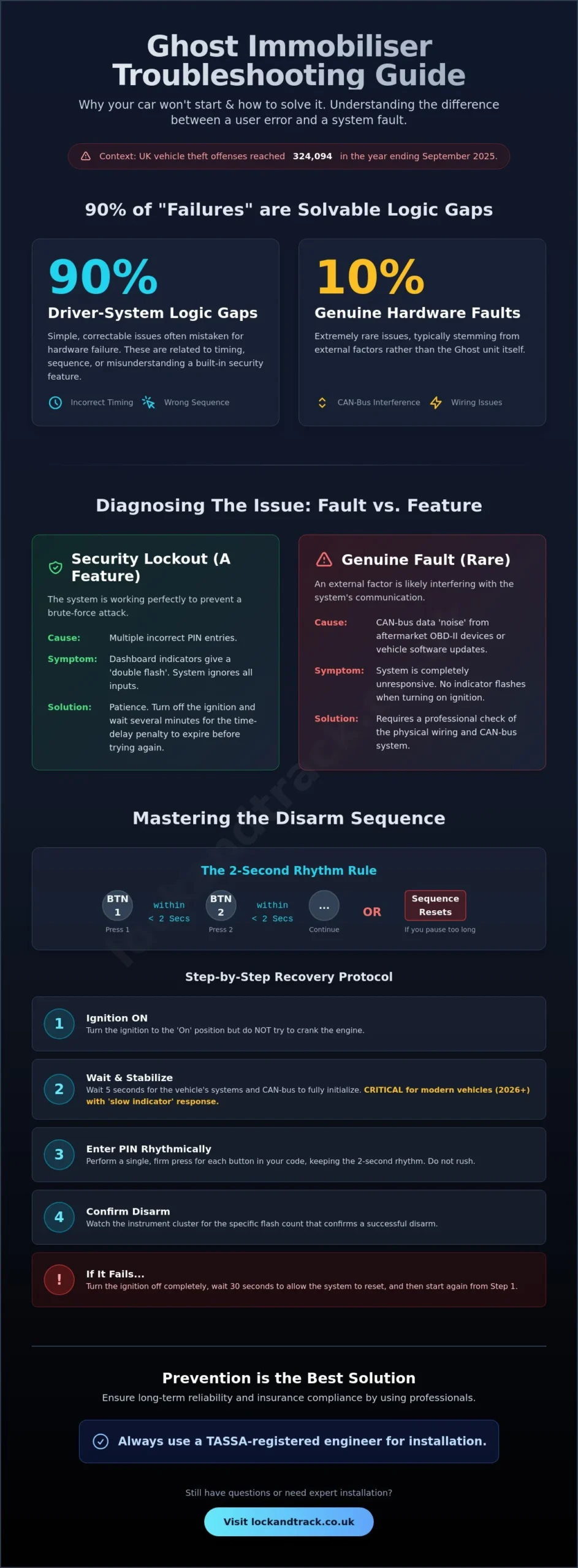
If you enter your PIN incorrectly several times, the system triggers a ‘Security Lockout.’ This isn’t a glitch; it’s a vital defense against thieves trying to guess your code. Modern firmware now includes a mandatory time-delay penalty.
During this window, the system will ignore all inputs, even the correct one. You can identify this state by watching for the ‘double flash’ from your dashboard indicators or a specific light on the instrument cluster. This signal confirms the system is active but currently restricted. Patience is the only fix here. Wait the full duration, usually several minutes, before attempting the sequence again.
Genuine Hardware vs. Software Glitches
True hardware failures are rare but usually stem from external interference. Aftermarket OBD-II devices, such as budget insurance trackers or diagnostic tools, can sometimes flood the CAN-bus with data.
This ‘noise’ prevents the immobiliser from detecting your button presses. Similarly, manufacturer software updates can occasionally alter how the car’s internal computer recognizes specific button signals on the network. If the system is completely unresponsive and the indicators don’t flash at all, a professional check of the physical wiring loom is necessary.
A secure, soldered connection is the only way to guarantee long-term stability against vibration and heat. Addressing ghost immobiliser problems and solutions requires looking at the vehicle as a complete ecosystem rather than an isolated device.
Solving Disarm Sequence Failures and PIN Code Lockouts
The most frequent call for help regarding ghost immobiliser problems and solutions involves a failure to disarm the system. This rarely indicates a broken unit. Instead, it’s usually a timing issue. The Ghost 2 Immobiliser requires a specific, rhythmic input to register your PIN. Each button press must occur within a two-second window of the previous one. If you pause for too long, the system resets the sequence. This precision is what makes the device so effective. It ensures that accidental button presses don’t accidentally disarm your security.
In many 2026 vehicle models, particularly hybrids and EVs, we’re seeing a ‘Slow Indicator’ response. These modern vehicles often have a slight delay in their digital wake-up cycle. If you enter your code immediately after pressing the start button, the CAN-bus might not be ready to receive the data. You must wait for the dashboard to fully initialize. Only then should you begin your sequence. This adherence to TASSA Certification Standards ensures that the immobiliser remains a reliable guardian, even as vehicle technology becomes more complex.
Step-by-Step Disarm Sequence Recovery
If your car won’t start, follow this protocol to reset the logic. Turn the ignition to the ‘On’ position but don’t try to crank the engine. Wait five seconds for all systems to stabilize.
Perform a single, firm press for each button in your code. Don’t rush. Watch the instrument cluster for the specific flash count that confirms a successful disarm. If you don’t see the flashes, turn the ignition off completely, wait thirty seconds, and try again. If you’re still struggling with consistent entries, you might need a professional to reconfigure your button assignments for better tactile feedback.
Using Your Emergency Override Code
Every Autowatch Ghost 2 comes with a unique four-digit emergency PIN located on your security card. This is your ultimate fallback if a button fails or you forget your sequence. To use it, you’ll typically need to use a combination of the accelerator pedal and the service button. Press and hold the accelerator to the floor, then enter the first digit of your emergency code using the service button.
Release the accelerator, then repeat the process for the remaining three digits. If you’ve lost your emergency card, you’ll need to contact an authorized installer. They can verify your identity and help reset the system, as there’s no “master code” that thieves can exploit. This level of protection is why the Ghost remains a premier choice for ghost immobiliser problems and solutions in the modern era.
Resolving Stop-Start Glitches and Dashboard Warning Lights
The Ghost 2 Immobiliser is engineered to be a silent guardian, yet its deep integration with the vehicle’s Engine Control Unit (ECU) can occasionally trigger unexpected dashboard behavior.
These instances aren’t system failures. They are usually communication mismatches. When addressing ghost immobiliser problems and solutions, we must consider how the device interacts with modern power management features. The Ghost acts as a gatekeeper on the CAN-bus network. If the ECU expects a signal that the Ghost is intentionally blocking, the car’s computer might generate a soft fault code.
Battery health is paramount for digital security. A drop in voltage, even a minor one, can destabilize CAN-bus data packets. If your battery is aging or weak, the Ghost 2 might not receive a clean signal from your button presses. This leads to failed disarm attempts or “ghost” fault codes that appear during diagnostic scans. These codes often indicate a temporary communication loss rather than a hardware defect. Keeping your vehicle’s power cell at peak performance is the simplest way to maintain a seamless security experience.
Adjusting Stop-Start Compatibility
Stop-start systems save fuel but can conflict with an immobiliser’s arming logic. If your car shuts down at a red light, the system needs to distinguish between a deliberate engine pause and an attempted theft. With the mandatory implementation of new cybersecurity regulations on June 1, 2026, the interaction between security hardware and vehicle software has become more intricate. For these newer models, specific firmware updates ensure the Ghost recognizes the vehicle’s “Ready” state. This prevents the system from re-arming while you’re still in traffic. Expert installers can bypass these interferences by fine-tuning how the device monitors ignition states.
Clearing False Warning Lights
An Engine Management Light (EML) might trigger if you attempt to start the engine multiple times without a successful disarm. The ECU detects a lack of ignition and assumes a sensor has failed. This is a secondary effect of the security lockout feature. To clear these, perform a safe system reset. Turn the ignition off for at least 60 seconds to allow the ECU to enter “sleep” mode. Using a professional installer ensures the wiring is integrated cleanly, which minimizes the risk of permanent fault codes. If you encounter persistent ghost immobiliser problems and solutions related to dashboard alerts, a quick battery health check often resolves the issue instantly.
Troubleshooting App Connectivity and Valet Mode Challenges
Digital convenience should never compromise your vehicle’s physical safety. While the Autowatch Ghost app offers a seamless disarm experience, it relies on Bluetooth protocols that can occasionally falter. Understanding how to manage these ghost immobiliser problems and solutions ensures you aren’t left stranded because of a software handshake error. Whether you’re handing your keys to a mechanic or syncing a new phone, the system’s logic remains robust and predictable. It’s built to be a reliable guardian, even when your smartphone is acting up.
Multiple smartphone connections are possible but require careful management. The system prioritizes the first paired device it detects within the immediate vicinity. If two authorized phones are in range, signal competition may cause a temporary disarm delay. Always ensure your primary device is updated to the latest 2026 operating standards to maintain a stable link with the CAN-bus hardware. This proactive approach prevents the technology from becoming a hurdle during your daily commute.
Mastering Valet and Service Mode
Valet mode is your primary tool for maintaining security during dealership maintenance or car washes. It allows others to drive the vehicle without you revealing your private PIN. To enter this mode, enter your normal disarm sequence followed by five firm presses of the service button. Five indicator flashes confirm the system is now in Service mode.
This state allows the car to be started and driven normally without the immobiliser intervening. The Ghost 2 will automatically exit this mode if the vehicle exceeds 31 mph for a continuous 15-minute period. This fail-safe ensures your security resets even if you forget to manually reactivate it after a service appointment. It’s a simple solution for a common logistical challenge.
Smartphone App Troubleshooting
App connectivity issues often stem from outdated software or local signal noise. The Autowatch Ghost-II app received a critical update on August 30, 2025, specifically to support Android 15 and the latest iOS security patches. If your phone fails to disarm the vehicle, check for external interference. High-density urban areas with heavy radio traffic or large metal structures can disrupt low-energy Bluetooth signals.
Treat the app as a secondary convenience rather than a replacement for your PIN. Your physical button sequence is the only 100% reliable disarm method in high-interference zones. If pairing fails, delete the vehicle profile from the app and re-pair using your unique Bluetooth code. For persistent connectivity issues, you can book a system health check to ensure your firmware is fully optimized for 2026 mobile devices.
Preventing Future Problems with Professional Nationwide Installation
A significant portion of reported ghost immobiliser problems and solutions can be traced back to the initial installation phase. When a security device is integrated poorly, it creates digital “noise” on the vehicle’s CAN-bus.
This leads to intermittent starting issues, unresponsive buttons, and frustrating system lockouts. You shouldn’t have to fight your car’s security to get on the road. Choosing a TASSA-registered engineer ensures that your Ghost 2 Immobiliser is fitted according to strict industry protocols. These specialists understand the unique wiring diagrams of modern 2026 vehicles, ensuring the device remains hidden while functioning flawlessly.
Lock and Track provides a comprehensive nationwide mobile installation service to eliminate these risks from day one. We don’t just fit the hardware; we provide a full post-installation handover. Our engineers stay with you until you’ve mastered your disarm sequence and understand the 2-second rhythm required for success.
This personal training session is the most effective way to prevent future user errors. By the time our specialist leaves your driveway, you’ll have absolute confidence in your vehicle’s protection and your ability to operate it.
The Value of Thatcham-Approved Fitting
Professional loom integration is about more than just hiding wires. It involves verifying system integrity across all CAN-bus nodes to ensure the immobiliser doesn’t interfere with other critical vehicle functions.
DIY attempts or uncertified “side-street” installations often lead to permanent dashboard warning lights because the ECU detects a breach in its communication network. Expert fitting ensures the Ghost 2 remains invisible to both thieves and the car’s internal diagnostics. A precision-engineered installation by a certified specialist is the only way to ensure your security hardware never becomes a technical liability.
Secure Your Peace of Mind with Lock and Track
Our nationwide network of security specialists is always available to provide ongoing support and re-coding services. If you decide to sell your vehicle or change your button sequence, our team can assist with a professional reset.
We understand that your security needs evolve, and our proactive service model reflects that reality. We position ourselves as your long-term security partner, monitoring the latest theft tactics to keep your assets safe. Don’t leave your vehicle’s safety to chance or amateur installers. Secure your vehicle with a professionally installed Ghost 2 Immobiliser to ensure total reliability and insurance compliance from the very first mile.
Restore Total Control Over Your Vehicle Security
Effective vehicle protection shouldn’t be a source of stress. Most ghost immobiliser problems and solutions are rooted in understanding the system’s digital logic rather than fixing mechanical failures. By mastering the precise disarm rhythm and keeping your smartphone app updated for 2026 operating systems, you ensure your Autowatch Ghost remains a silent, reliable guardian. These small adjustments transform a complex security layer into a simple, daily routine that preserves your peace of mind.
The foundation of a trouble-free experience is professional integration. Lock and Track offers a nationwide mobile installation service performed by Thatcham-approved engineers. As a TASSA registered company, we guarantee that your system is installed with technical precision to avoid dashboard glitches and CAN-bus interference. Our specialists provide a full post-installation handover so you can operate your device with absolute certainty from day one. Book your professional Ghost 2 Immobiliser installation today and secure your asset with the industry’s highest standards. Your vehicle deserves the protection of a modern, expertly fitted fortress.
Frequently Asked Questions
Why is my Ghost immobiliser not flashing the indicators when I enter my code?
Your indicators won’t flash if the vehicle’s ignition is not fully in the ‘On’ position or if the system is currently in a security lockout mode. Ensure you wait for the dashboard to initialize fully before entering your disarm sequence. If the indicators still don’t respond, the system may have entered a temporary time-delay penalty due to previous incorrect attempts. This is a common aspect of ghost immobiliser problems and solutions that requires patience rather than a hardware fix.
Can I change my Ghost PIN code if I think someone has seen it?
You can change your PIN code at any time to maintain absolute security. The process involves entering your existing code and then using a specific sequence with the service button and your chosen new inputs. This ensures that even if someone observes your sequence, you can immediately restore your vehicle’s protection. We recommend updating your code periodically as a proactive security measure to counter evolving theft tactics and maintain total peace of mind.
What happens if I lose my Ghost 2 emergency override card?
Losing your emergency card means you lose the ability to bypass the system if you forget your PIN. Because there is no master code, you must contact an authorized TASSA-registered installer to reset the device. They will verify your ownership and identity before performing a secure factory reset of the hardware. This strict protocol ensures that a thief cannot simply call for a reset to steal your vehicle, keeping your asset protected under all circumstances of Ghost Immobiliser Problems.
Will a Ghost immobiliser drain my car battery if left for a long time?
The Ghost Immobiliser Problems has an extremely low power draw of approximately 1mA, making it one of the most efficient security devices available. It won’t drain your battery even during extended periods of inactivity. If your battery fails, it’s likely due to the vehicle’s own parasitic drain or the age of the battery itself rather than the Ghost Immobiliser Problems. Ensure your battery remains healthy to provide the stable voltage required for the CAN-bus network to operate correctly.
How do I put my Ghost immobiliser into Valet mode for a service?
To enter Valet mode, enter your normal disarm sequence and then press the service button five times. The indicators will flash five times to confirm the system is in Service mode. This allows mechanics to drive the car without needing your private PIN. The system automatically exits this mode once the vehicle exceeds 31 mph for a continuous 15-minute period or if you manually enter your disarm code again before driving.
Why does my car start and then immediately stall with the Ghost installed?
Some vehicles are configured with a ‘stall-on-start’ setup where the engine fires but dies instantly if the code isn’t entered. This is an intentional security feature designed for specific engine management systems that cannot be blocked prior to ignition. If this happens unexpectedly, check that you haven’t accidentally triggered a security lockout. Understanding these ghost immobiliser problems and solutions helps you distinguish between a protective system response and a genuine engine fault.
Is the Ghost 2 immobiliser compatible with 2026 electric and hybrid vehicles?
The Ghost 2 is fully compatible with 2026 electric and hybrid vehicles, including those requiring UN Regulation 155 cybersecurity compliance. It integrates seamlessly with the high-voltage systems and ‘Ready’ modes found in modern EVs. Our engineers use specific firmware versions to ensure the immobiliser doesn’t interfere with complex power management software. This provides a high-tech defense for the most advanced vehicles on the market today without compromising performance.
Can a car thief bypass the Ghost immobiliser by cutting the wires?
Cutting wires will not bypass the Ghost because it’s a digital device, not a simple physical switch. The system is hidden deep within the vehicle’s wiring loom and communicates via encrypted data packets on the CAN-bus. If the unit is disconnected or the wires are cut, the communication remains blocked, preventing the engine from starting. This makes it immune to traditional theft methods like hot-wiring or relay attacks that rely on physical circuit manipulation.